


Is Adobe Stock Worth It? Find Out In Our Review
Adobe Stock is a comprehensive stock asset service offering high-quality photos, illustrations, videos, templates, and 3D assets for creative projects. Integrated seamlessly with Adobe Creative Cloud applications like Photoshop and Premiere Pro, it allows users to browse, license, and use assets directly within their workflows. Its extensive library and flexible licensing make it a valuable tool for designers, marketers, and content creators seeking to enhance their projects efficiently and with professional-grade resources.

If you're immersed in creative projects, sourcing the perfect stock assets can truly elevate your work. Adobe stands out as a top choice for professionals and businesses looking for high-quality photos, videos, and more. But how do you know if it's the right fit for you? In this comprehensive review, we'll delve into its features, pricing options, user feedback, and compare it to competitors so you can make an informed decision.
Heres the short answer: Adobe Stock is a top choice for high-quality stock photos, illustrations, and videos. With a vast library of content and seamless integration with Adobe Creative Cloud, it's perfect for professionals and creatives looking for stunning visuals to enhance their projects.
Brief History

Launching in 2015 as part of Adobe’s Creative Cloud suite, the stock agency provides users with seamless access to high-quality stock photos, illustrations, vectors, videos, templates, and 3D assets. It originated from Adobe’s acquisition of Fotolia, a popular stock image platform, in 2014. This service set itself apart by integrating directly with Creative Cloud applications like Photoshop, Illustrator, and Premiere Pro, allowing creatives to search, license, and edit assets without leaving their workflows. Still, it's available as a stand-alone service as well. Over the years, it has grown into one of the top stock media platforms, offering millions of assets and empowering individuals and businesses in their creative projects.
Features and Benefits of Adobe Stock
Adobe has become an essential resource for creative professionals and businesses, offering a vast library of high-quality assets integrated seamlessly with Adobe Creative Cloud. As a one-stop platform, it caters to various creative needs, whether you're designing, editing, or producing content. Its rich collection of photos, videos, illustrations, templates, 3D assets, and audio ensures users can find the perfect match for any project. Check out just some of the things you can do with their assets here.
Here’s what makes them really stand out:
1. Extensive Content Library: Access to millions of assets, including photos, illustrations, vectors, videos, 3D assets, templates, and audio. The variety ensures creators can find the perfect content for their projects, no matter the theme or style
2. Seamless Creative Cloud Integration: One of the standout features is its seamless integration with Adobe Creative Cloud apps like Photoshop, Illustrator, InDesign, and Premiere Pro. Users can browse, preview, and license assets directly within these programs, saving time and enhancing workflow efficiency
3. High-Quality and Curated Content: They emphasize quality by offering content from experienced contributors. Its curated collections and premium assets ensure that users have access to professional-grade resources that meet industry standards
4. Royalty-Free Licensing: All of their assets are offered with a royalty-free license, allowing unlimited use in multiple projects after a one-time purchase. This eliminates the complexity of tracking usage and provides greater creative freedom, check out more about their licensing here.
5. Flexible Subscription Plans: They offers flexible plans tailored to various needs, from individuals to large teams. Users can choose between subscription packages for regular content needs or on-demand credit packs for occasional use
6. Visual Search and AI-Powered Features: The platform includes AI-powered search tools through Adobe Sensei. Users can search for content using keywords, upload images to find visually similar assets, and even refine results based on color, composition, or other attributes
7. Contributor Opportunities: It's not just for users looking to license content—it’s also a platform for contributors. Creatives can earn money by uploading and selling their work on a globally recognized platform
8. Customization and Flexibility: Assets are designed with customization in mind. Users can edit assets directly in Creative Cloud apps, allowing for seamless adaptation to any project requirements
9. Global Appeal: With content available in multiple languages and catering to diverse industries and audiences, they provides resources that resonate worldwide, making them an ideal choice for international businesses and brands
In addition to these features, Adobe stands out with its commitment to supporting diverse creative needs through exclusive collections and content partnerships. For example, the Premium Collection offers exclusive, hand-picked assets from top artists and agencies, providing unique content that helps users create standout projects. Furthermore, the focus on trends ensures that users can access the latest styles and subjects relevant to their industries. This proactive approach to staying ahead of creative demands, combined with its intuitive user interface and consistent updates, makes this a powerful resource for professionals looking to produce impactful, high-quality designs with minimal effort.
As a graphic designer, video editor, or content marketer, this service provides the essential tools and resources to enhance your creative projects. The seamless integration with Adobe's ecosystem guarantees a hassle-free experience, allowing users to concentrate on unleashing their creativity rather than getting bogged down in logistics.
Pricing Options and Subscription Plans
Adobe Stock provides a range of pricing options tailored to meet the diverse needs of users, whether they are individuals or businesses. Whether you're an occasional user or part of a creative team with high-volume requirements, there is a plan that suits your specific usage scenario. Below, we delve into the specifics of these pricing models to assist you in selecting the perfect plan for your needs.
| Credit Pack Size | Cost per Credit | Total Cost |
|---|---|---|
| 5 Credits | $9.99 | $49.95 |
| 16 Credits | $9.37 | $149.99 |
| 40 Credits | $8.99 | $359.99 |
| 80 Credits | $8.74 | $669.99 |
| 150 Credits | $8.00 | $1,200.00 |
Yearly Subscription Plans:
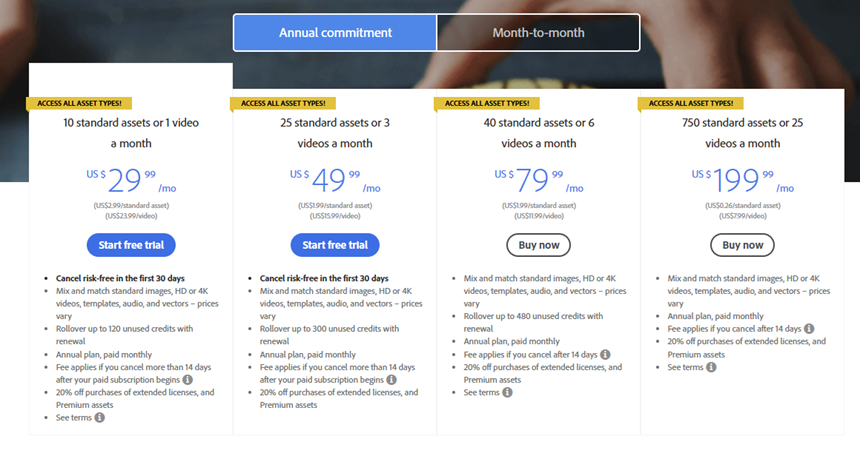
For those who use them frequently, subscription plans provide the ultimate value by offering a set number of downloads each month. They cater to different user needs and preferences with both annual commitment and month-to-month plans. Here are the pricing details for each type of subscription:
| Monthly Allowance | Cost per Month | Total Annual Cost |
| 10 assets | $29.99 | $359.88 |
| 25 assets | $49.99 | $599.88 |
| 40 assets | $79.99 | $959.88 |
| 750 assets | $199.99 | $2,399.88 |
Year to year plans are billed monthly, offering significant savings over their month-to-month counterparts. These plans also include rollover for unused downloads, with limits depending on the plan.
Monthly Subscription Plans:
| Monthly Allowance | Cost per Month |
| 3 assets | $29.99 |
| 25 assets | $69.99 |
| 40 assets | $99.99 |
| 750 assets | $249.99 |
Month-to-month plans provide flexibility without the long-term commitment. While they come at a higher monthly cost compared to annual plans, they’re an excellent choice for users with fluctuating or short-term needs.
Whether you’re an occasional creator or part of a large creative team, the pricing options provide flexibility to meet a variety of needs. While credit packs offer convenience for sporadic use, subscription plans deliver value for regular users. Businesses can take advantage of team and enterprise plans to streamline workflows and manage resources effectively. Although the pricing may be a bit higher than some competitors, its quality, extensive image library, and Creative Cloud integration make it a compelling choice for professionals seeking top-tier stock content. See a breakdown of Adobe Stock pricing here!
User Reviews and Feedback on Adobe Stock
User feedback for this platform highlights its vast library and the quality of its assets as major positives. Creative professionals appreciate the integration with Adobe Creative Cloud, which simplifies the process of incorporating stock assets into their projects. The advanced search functionality receives praise for its accuracy and efficiency.
The availability of curated collections and seasonal content is another aspect that users find valuable, particularly for projects requiring timely and relevant visuals. Their AI-powered search engine, Adobe Sensei, often draws positive remarks for its ability to streamline the search process and deliver highly relevant results.
Users also value the flexibility offered by the various pricing models. Credit packs provide a pay-as-you-go option, which many find useful for irregular usage, while subscription plans cater well to those with frequent needs. The rollover feature for unused downloads is frequently noted as a significant benefit, especially for businesses with variable project timelines.
Additionally, users from creative teams often highlight the convenience of their collaborative tools. Shared libraries and team management features are highly regarded, making them a practical choice for businesses and agencies handling multiple projects simultaneously.
However, some users note that the agencies premium content can be expensive, particularly for small businesses or individual creators with limited budgets. There are occasional mentions of the learning curve associated with integrating them into Creative Cloud applications, although this is less of an issue for seasoned Adobe users.
Despite these drawbacks, most users consider them a reliable and valuable resource for high-quality creative content, especially when integrated into Adobe’s powerful suite of tools.
Comparison With Other Stock Photo Websites
Adobe Stock stands out in the competitive world of stock photo platforms due to its unique features and integration capabilities. Unlike many competitors, They offer built-in integration with their Creative Cloud suite of apps, streamlining workflows and enabling users to access, license, and edit assets directly within popular tools like Photoshop, Illustrator, and Premiere Pro. This seamless connection provides a significant edge for professionals already embedded in Adobe's ecosystem.
Shutterstock, iStock, and Envato, on the other hand, offer integration via plugins. While these plugins enhance functionality, they require separate installations and might not deliver the same fluid experience as Adobe's native integration. However, these platforms bring their own strengths to the table, making them viable alternatives depending on user needs.
Shutterstock is known for its extensive library and flexible pricing, catering to diverse creative requirements. It offers a larger volume of assets than Adobe, which can be a crucial factor for users who prioritize quantity over Adobe-specific integration.
iStock by Getty provides high-quality images at affordable prices, making it an excellent choice for budget-conscious users who require premium content. Its plugin for Adobe Creative Cloud, while not native, offers sufficient functionality for most design tasks.
Envato takes a unique approach by bundling its stock assets with templates, audio files, and other creative resources in a subscription-only model. This platform is ideal for creators who need a variety of content types for their projects.
Here is a quick comparison with other major platforms:
| Feature/Platform | Adobe Stock | Shutterstock | iStock by Getty | Envato |
|---|---|---|---|---|
| Integration | Seamless with Adobe CC | With Adobe CC (via plugin) | With Adobe CC (via plugin) | With Adobe CC (via plugin) |
| Content Variety | Extensive | Larger library | High-quality images | Includes templates |
| Pricing | Mid to high | Flexible plans | Affordable packs | Subscription only |
| Search Functionality | AI-powered | Standard | Standard | Standard |
| Collaboration Tools | Yes | Yes | No | Limited |
While Shutterstock, iStock, and Envato all offer plugins for Creative Cloud interoperability, Adobe stands out with its built-in integration. This native integration allows for a more seamless and smoother workflow within Adobe applications, eliminating the need for additional installations or adjustments. For users deeply embedded in the Adobe ecosystem, this advantage enhances both efficiency and user experience, making them a preferred choice despite its higher price point.
Final Verdict: Is Adobe Stock Worth The Investment?
Adobe Stock is the ultimate resource for professionals and businesses deeply immersed in the Adobe Creative Cloud ecosystem. Its seamless integration, top-notch assets, and advanced search capabilities make it an invaluable tool for elevating creative projects. The built-in compatibility with Adobe software gives users a significant edge, streamlining workflows for those heavily reliant on the platform. While their pricing may lean towards the higher end compared to some competitors, the convenience, quality, and efficiency they offer often justify the investment for regular users. Unique features such as rollover options for unused downloads, collaborative tools tailored for teams, and comprehensive licensing indemnification further enhance its appeal for professional use.
Ultimately, they are a premium choice for individuals and teams looking for high-quality assets and effortless compatibility with industry-standard design tools. It’s a worthwhile investment for professionals who prioritize quality and efficiency in their creative projects.
User Reviews
Only logged in customers who have purchased this product may leave a review.









Anonymous –
Visitor Rating: 2 Stars
Anonymous –
Visitor Rating: 4 Stars
Anonymous –
Visitor Rating: 2 Stars
Anonymous –
Visitor Rating: 1 Stars
Anonymous –
Visitor Rating: 1 Stars
Anonymous –
Visitor Rating: 2 Stars
Anonymous –
Visitor Rating: 2 Stars
Anonymous –
Visitor Rating: 2 Stars