Using Adobe Stock Safely: A Comprehensive Guide to Licensing


Adobe Stock is a must-have tool for creative professionals, offering an extensive collection of top-notch images, videos, templates, and 3D assets. Understanding the different licensing options available is key to fully leveraging the platform's benefits. This comprehensive guide will break down the various license types and provide valuable insights on optimizing these resources in your projects.

What is Adobe Stock?
As a leading platform in the industry, Adobe provides access to an extensive library of creative assets, including licensed images, illustrations, videos, and templates. With seamless integration into Creative Cloud applications, users can easily discover and utilize these assets directly within their preferred design tools. This enhanced workflow experience allows for a more efficient and streamlined creative process. You can learn more about it in our Adobe Stock review.
Understanding the Different Usage Options
When utilizing the incredible resources available on this platform, it's crucial to have a solid grasp of the various licensing options at your disposal. Each license comes with its own set of unique terms and conditions that you must adhere to. The platform offers royalty-free licenses, which means you pay for them once and can use the assets indefinitely within the agreed-upon parameters. Here are the key Adobe Stock licensing information and usage rights:
Standard
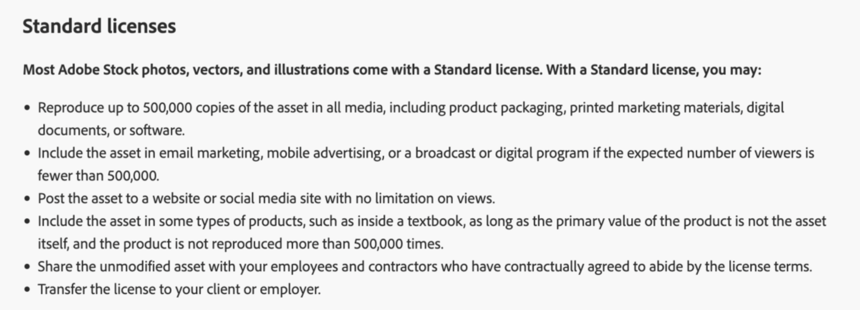
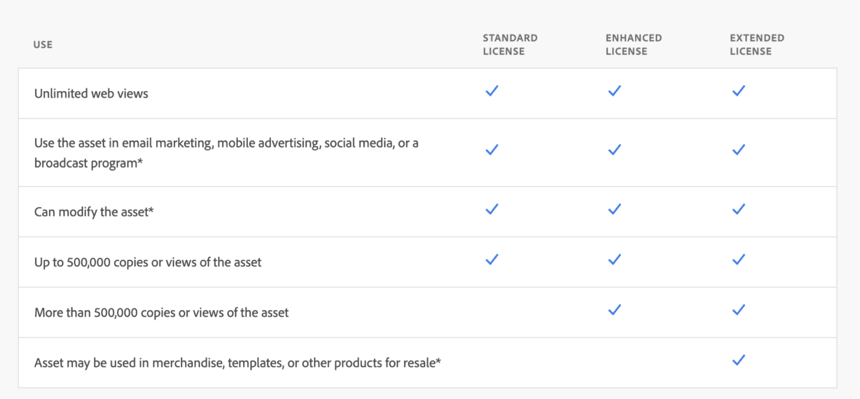
The standard license allows users to download and use assets in various projects, including websites, presentations, advertising, and social media. It covers commercial and personal use, offering flexibility for a wide range of applications, and allows for extensive asset modifications. However, restrictions include a limit of 500,000 copies or viewers, a prohibition against using assets in products for resale or redistribution, and they cannot be used in offensive, defamatory, or illegal content.
This agreement is included by default with all assets; the platform offers two buying options for standard assets: credit packs or subscription plans. Prices typically range from $9.99 for individual images with credit packs to lower costs per image with a subscription, as low as $0.25 apiece, depending on the plan chosen.
Enhanced
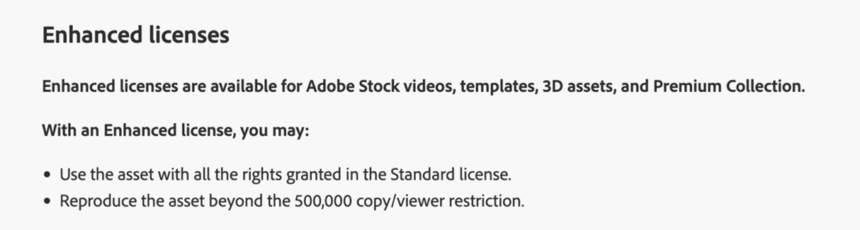
The enhanced license offers all the rights from the standard option but allows unlimited copies and viewers. Restrictions include prohibitions against using assets in defamatory or illegal content, using them as part of merchandise, and redistributing the asset itself. This license applies specifically to stock videos, templates, 3D assets, and all content marked as Premium. The enhanced license is not optional for these assets. Prices typically range from $79.99 to $199.99 per asset, depending on the media type, and are available on-demand only.
Extended
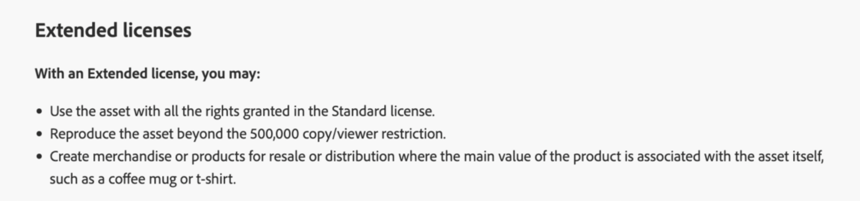
The extended license provides even broader usage rights than the standard and enhanced licenses. It allows unlimited print runs, use in merchandise for resale, and incorporation of assets in products for distribution (e.g., templates, branded items). Restrictions include prohibiting using assets in offensive, defamatory, or illegal content. The license is available upon manual selection with almost every asset, and it's an on-demand purchase only, with prices ranging from $179.99 to $499.99 per asset, depending on the media type.
Limited (Adobe Express)
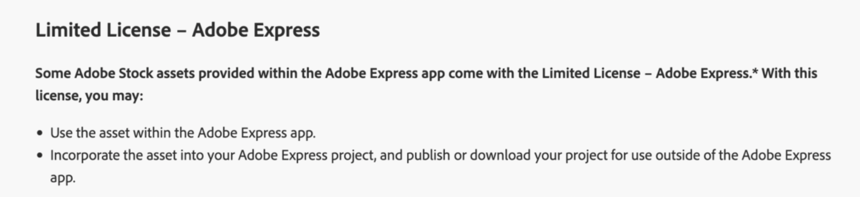
The limited license applies only to assets from the catalog that are made available via Adobe Express –an all-in-one, user-friendly design app. It covers personal and commercial use within designs made on the Express platform, such as social media posts, flyers, and presentations. The agreement does not cover using assets independently from an Express-made design. It allows editing and customization but restricts resale and redistribution. Prices for Adobe Express assets typically range from $1.99 to $4.99 per item, available through Adobe Express’s in-app purchase options. A subscription with unlimited downloads is also available.
Editorial
Assets labeled as “Editorial-Use-Only” are under an editorial license, allowing the use of visuals only for newsworthy or public interest purposes in print and digital mediums. All personal and commercial uses are forbidden. And only minor technical edits –like slight cropping or resizing– are permitted. Editorial assets must be attributed, including a credit line with the author's name, agency, and website.
AI-Generated Assets
This service integrates text-to-image generation powered by Adobe Firefly, meaning you can edit and even create new visuals from scratch with AI and download them for use in your designs. Firefly is trained solely with authorized content, and its outputs are protected by IP indemnification against copyright claims. Providing you abide by the Firefly user guidelines, you'll be protected by this indemnification policy, making the AI-generated content a lot safer to use for commercial purposes.
For more details on the cost of assets, check out this breakdown of Adobe Stock pricing.
Choosing the Right Coverage for Your Needs
When selecting a license for your project, consider the following factors:
- Project Scope: Assess how you plan to use the assets. Will they be utilized in a limited capacity or for widespread distribution?
- Quality: Standard content is perfectly suitable for professional use, but Premium assets offer more excellent visual value and have more extensive usage rights
- Budget: Extended licenses generally come at a higher cost, the same for premium content. Evaluate your budget to determine which license and media type aligns with your needs
- Future Use: Think about whether you might want to use the assets in additional projects down the line
Tips for Ensuring Compliance with Legal Terms
When using assets on your projects, it’s important to follow the terms of their usage to avoid legal issues and penalties. Correctly understanding and following these terms helps protect both you and the creators. Here are some tips to make sure you’re using assets the right way:
- Review licensing terms before downloading any assets to understand usage rights
- Use assets only for approved purposes, such as commercial or personal projects as specified
- Adhere to copyright restrictions and don’t modify assets beyond allowed limits
- Contact the agency directly to clarify any doubts regarding usage and type of license applicable beforehand
Best Practices for Using Assets Responsibly
When using stock assets, it's crucial to respect both the platform's guidelines and the creators' intellectual property to use other people's work responsibly. Here are some best practices to follow:
- Read the License Agreement: Always review the license terms to understand how you can use the asset
- Avoid Unauthorized Distribution: Don’t redistribute assets as standalone items or allow them to be used in unauthorized ways
- Respect Trademarks and Copyrights: Ensure assets don’t infringe on existing trademarks or copyrighted content
- Use with Respect: Ensure content is used in a non-offensive and respectful manner
- Attribution: When required, give proper credit to the creator
How to Avoid Copyright Infringement
All assets on this site are copyrighted and belong to the artists that created them. Obtaining a license from the platform is the only way to use these assets legally and respect the author's copyright.
Furthermore, adhering to the license terms ensures that you comply with the agency's guidelines and respect the asset owner's rights.
Common Misconceptions About Licensing
Many users have misconceptions about licensing that can lead to improper use of assets. Here are some common myths debunked:
| Myth | Reality |
|---|---|
| Royalty-free images are free to use | Royalty-free licenses are a one-time pay, use-forever deal with very affordable price points |
| You can right-click download images and use them for free | The only legitimate way to license a stock asset is by using the download button on the website, which requires payment. Any other method of downloading assets is deemed copyright infringement and image theft |
| You can use comp images in your designs | Comp images are for previewing/test editing only. They are watermarked, the resolution is downgraded, and cannot be used in any published projects |
| Images can be used however you like once downloaded legally | Images must be used according to the specific license terms, which may include restrictions on distribution and modification |
| Standard licenses cover all types of projects | Standard licenses have limitations, especially for high-volume distribution or resale. Extended licenses may be necessary for those uses |
| Once purchased, a license is permanent | Licenses can be revoked if terms are violated, so it's essential to adhere to the usage guidelines |
Pros and Cons of Using Adobe Assets for Creative Projects
Before committing to this provider, it's essential to weigh the advantages and disadvantages of its licenses:
Key Considerations for Choosing This Supplier
When deciding whether to use this service for your projects, keep these key points in mind:
- Assess Your Needs: Determine the type of assets and usage rights you require and how frequently you will use them
- Understand the Costs: Review the pricing structure for both standard and extended licenses to find what fits your budget
- Consider Buying Methods: Not all licenses are available with all purchasing methods; review your options to make an informed choice
- Think of Unique Advantages: Adobe Stock is ideal for Creative Cloud users as it enables a more seamless workflow; if you don't use Adobe apps in your creative process, you'd be missing out on a lot of its value
- Evaluate Alternatives: Consider other stock image platforms to see if they offer better pricing or licensing options for your specific needs
Conclusion
Adobe Stock is a powerful tool for creatives looking to enhance their projects with high-quality assets. By understanding the licensing options and adhering to the terms, users can effectively leverage this platform while avoiding potential pitfalls. Being informed will help you make the best decisions for your creative endeavors, whether you choose a standard, enhanced, or extended license.? Leave it in a comment below. We'll be happy to answer if we can!